


Tell a parent their child is "just not a numbers person" and the label tends to stick for years. We have heard it in our lobby for eleven years, across 9,500 students, and it has almost never held up. The child was fine. The teaching arrived in the wrong order.
School maths usually hands over the formula first and the reason much later. Building a platformer in Scratch, Roblox or Python flips that sequence. The maths turns up as a problem the child already cares about: the jump feels floaty, so the gravity value is wrong. The turret keeps missing, so the arctangent is off. The hit-box registers a strike before the sprites touch, so the distance formula needs work.
What follows is the specific maths children reach for while building games, where each piece sits in international school syllabuses from Primary through to IGCSE, and why building the formula tends to outlast memorising it.
Table of Contents
- Key Takeaways
- Why a Bad Jump Feels Wrong: Gravity, Velocity, and Acceleration
- Coordinates and the Screen Plane: Geometry Beyond the Textbook
- Vectors and Speed: Fixing the Diagonal Sprint Bug
- Angles and Trigonometry: Aiming Turrets and Circular Motion
- Collision and Geometry: Bounding Boxes and Pythagoras
- Probability and Randomness: Loot Drops and Fair Mechanics
- Percentages, Ratios, and Game Balance
- Grade-Level Syllabus Map: Game Mechanics vs School Maths
- Four Build-Along Mini Projects by Age Group
- How Kidocode Teaches Maths Through Game Building
- Printable Game Maths Debugging Checklist
- Frequently Asked Questions
- References
Key Takeaways
| Game Mechanic | Mathematical Concept | School Grade Level | Practical Learning Outcome |
|---|---|---|---|
| Character Movement | Cartesian Coordinates () | Year 4 to Year 7 | Master grid systems, positive/negative integers, and transformations. |
| Diagonal Speed Control | Vector Normalisation & Magnitude | Year 8 to IGCSE | Understand standard vector operations and Pythagorean distance. |
| Rotating Turrets & Aiming | Trigonometric Ratios () | Year 9 to IGCSE | Apply right-angled trigonometry to resolve angles and trajectories. |
| Hit Detection | Distance Formula & Circle Collision | Year 7 to Year 10 | Use to determine spatial boundaries. |
| Loot Drops & Enemy Spawns | Probability & Expected Value | Year 5 to IGCSE | Calculate theoretical vs experimental probability and weighted outcomes. |
| Health Bars & Damage | Ratios, Percentages & Functions | Year 5 to Year 9 | Model linear and non-linear scaling curves for game balance. |
Why a Bad Jump Feels Wrong: Gravity, Velocity, and Acceleration
Any child who plays games can tell you when a jump feels wrong. Too floaty, too heavy, weirdly sticky at the top of the arc. What they usually cannot tell you is that the fix is algebra.
A jump in a platformer is not an animation that plays. It is a calculation that runs sixty times a second. So a child cannot simply nudge the vertical position by a fixed number of pixels per frame. Move the character up ten pixels every frame and it rises like a lift, stops dead at the top, then drops like a brick.
Motion that reads as real needs gravity and acceleration in it:
graph TD
    A[Press Jump Key] --> B[Set Y-Velocity to -15]
    B --> C[Apply Frame Loop]
    C --> D[Add Gravity +1 to Y-Velocity]
    D --> E[Update Y-Position by Y-Velocity]
    E --> F{Is Character on Ground?}
    F -- No --> C
    F -- Yes --> G[Reset Y-Velocity to 0]
Set the initial impulse to (negative moves upward on a screen coordinate plane) and gravity adds a positive value such as back to the velocity each frame. The rise slows, velocity hits zero at the peak, then the sign flips and the fall accelerates on its own.
Landing feels sluggish? Change the gravity coefficient. Jump feels twitchy? Change the initial velocity. Inside ten minutes of testing, a ten-year-old has run dozens of evaluations of a linear equation and watched rate of change do something visible.
A systematic literature review on constructionist game making synthesized 55 empirical studies across 9,000 students and found that 44% of research focused explicitly on how children develop computational problem-solving strategies through these iterative adjustments [1]. Twenty workbook problems produce a ticked page. Twenty variable changes in code produce twenty answers the child can see.
Coordinates and the Screen Plane: Geometry Beyond the Textbook
In school geometry, the origin sits in the middle or the bottom-left corner of the graph paper. Right increases . Up increases . Nobody questions it.
Then the child opens Pygame, HTML5 Canvas or a JavaScript project and the floor tilts. Scratch keeps the familiar centred origin, but most real 2D graphics frameworks put at the top-left corner of the display, with growing downward.
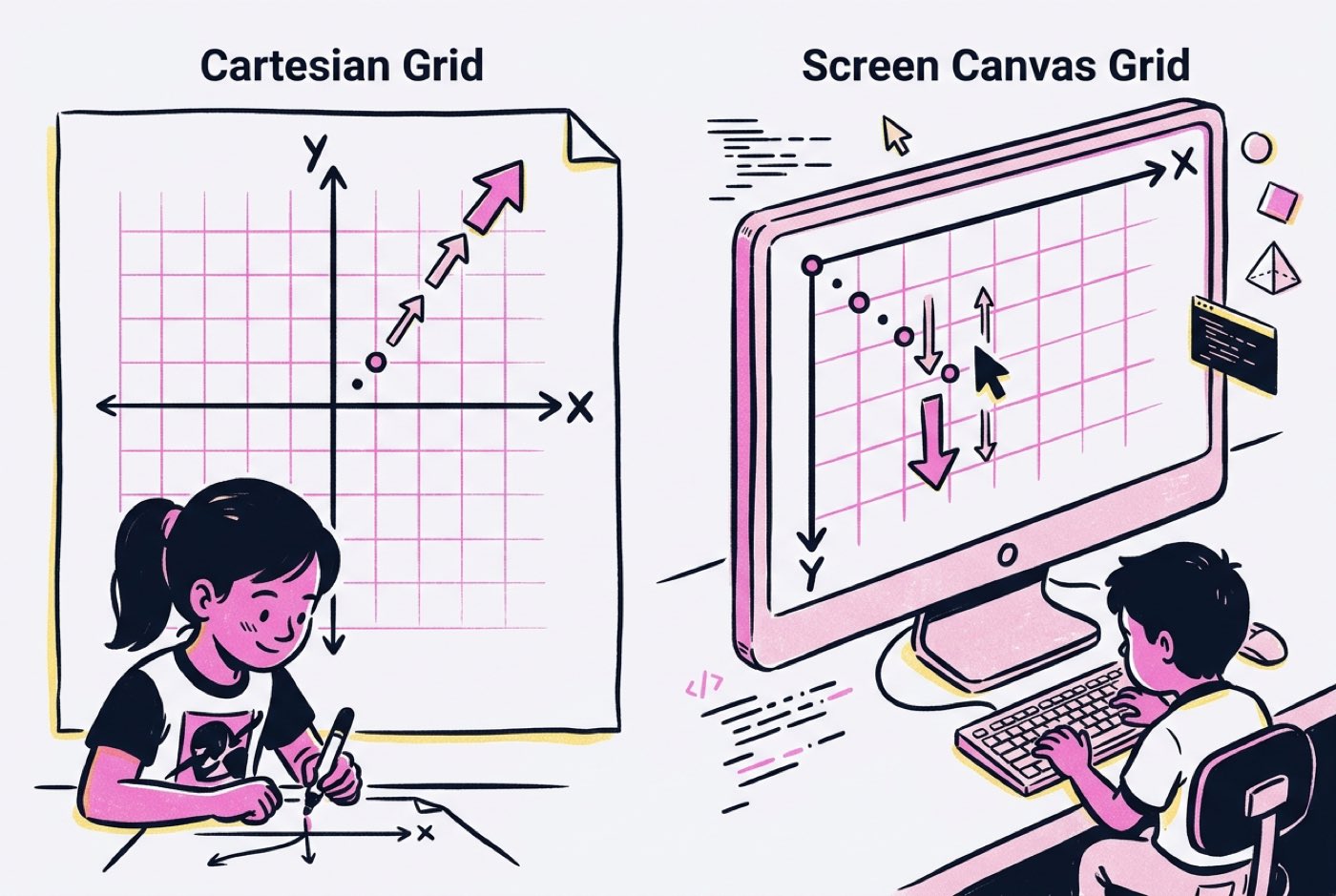 On a screen plane:
- Moving Right increases ()
- Moving Left decreases ()
- Moving Down increases ()
- Moving Up decreases ()
That single inversion does real work. To make a falling obstacle fall, you add to . Children who have only ever met one orientation of an axis have to notice that the axis was a convention all along, not a law.
Step into Roblox or Unity and a third axis arrives:
The academic payoff shows up fast. A study evaluated Ghanaian secondary students learning coordinate geometry through Scratch visual programming and recorded an 83.9% overall situational interest score [2]. A coordinate pair that stores where the player is standing, where the waypoint sits, or where the screen ends is no longer a dot on a worksheet.
Parents looking to bridge early spatial skills into structured learning can explore our guide on early math for 5 to 7 year olds without worksheets.
Vectors and Speed: Fixing the Diagonal Sprint Bug
Nearly every beginner game ships with the same bug. Pressing 'Right' adds to . Pressing 'Up' subtracts from . Press both and the character moves on both axes in the same frame.
The actual shift is not units. It is the hypotenuse:
That is over 41% faster on the diagonal than straight along either axis, and players find it in about a minute. Walk sideways and forward at once and nothing can catch you.
The fix is vector normalisation. A velocity vector carries a direction and a magnitude, and the magnitude comes straight from Pythagoras:
Divide each component by that magnitude and the vector keeps its direction but shrinks to length :
import math

def get_normalized_movement(dx, dy, speed):
    magnitude = math.sqrt(dx**2 + dy**2)
    if magnitude == 0:
        return 0, 0

    # Normalize vector and scale by intended movement speed
    normalized_x = (dx / magnitude) * speed
    normalized_y = (dy / magnitude) * speed
    return normalized_x, normalized_y
A thirteen-year-old writing those six lines is doing a topic usually reserved for senior secondary, and doing it because the alternative is a game their friends can cheat.
Angles and Trigonometry: Aiming Turrets and Circular Motion
Ask a secondary student which topic they dread and trigonometry comes up early. Sine, cosine and tangent get introduced as ratios belonging to triangles drawn on paper, and there the matter usually rests.
In a game, those same three functions are what make anything rotate, aim or orbit.
1. Aiming at a Target (Inverse Trigonometry)
A player sits at and wants to fire a projectile at an enemy at . The turret's rotation angle comes from the inverse tangent (, or atan2):
atan2(dy, dx) sorts out negative coordinates in all four quadrants without extra logic, which is why students reach for it once they have watched a turret point backwards.
2. Decomposing Direction into Motion (Sine and Cosine)
Knowing is only half the job. To send the projectile along that angle at a constant speed , the velocity has to be split into horizontal and vertical parts:
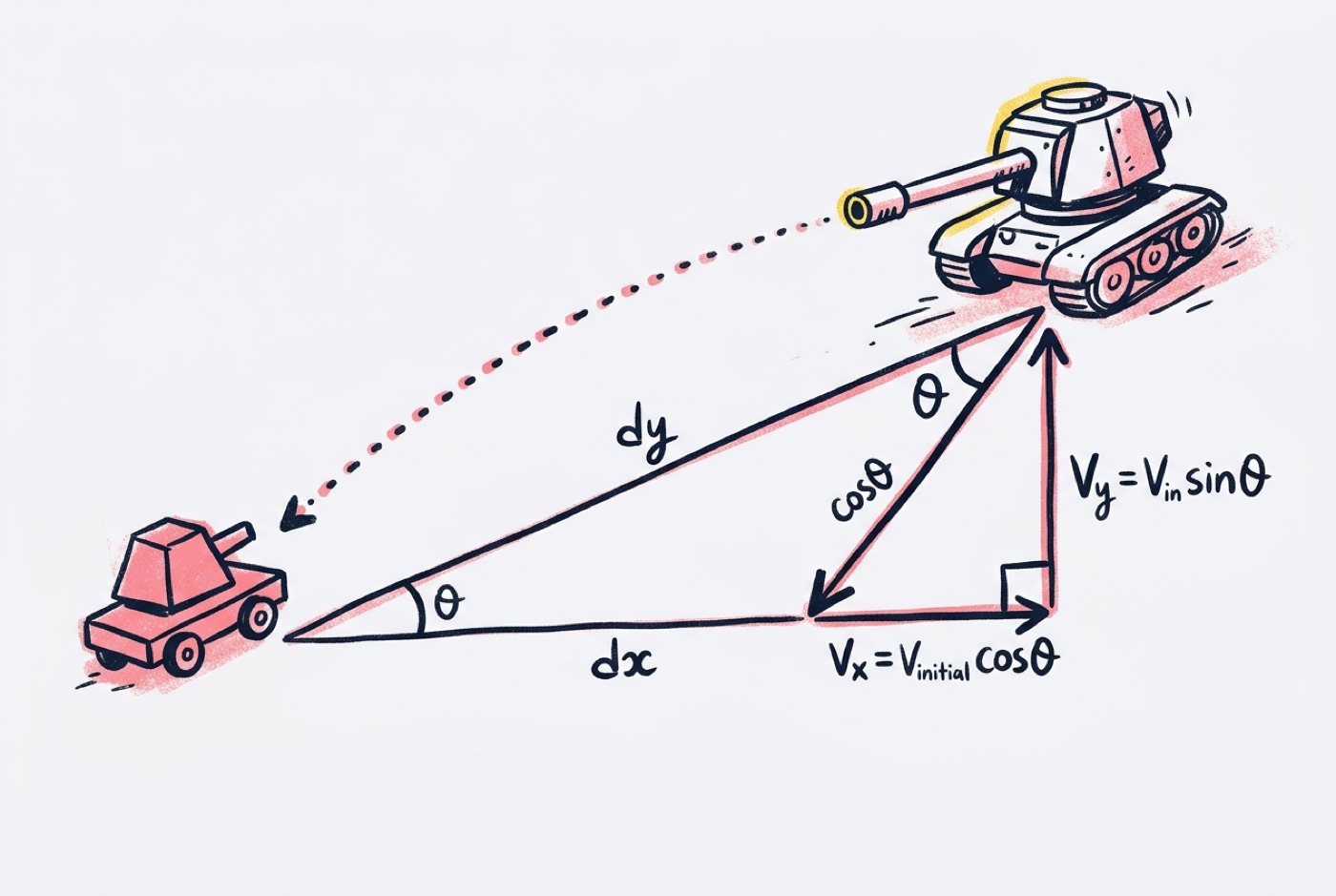 The same pair of functions puts a moon in orbit around a planet. Advance the angle a little each frame and recalculate the position:
Watching a barrel track a mouse cursor across the screen gives and something to be about.
Collision and Geometry: Bounding Boxes and Pythagoras
Something has to decide whether the laser hit the asteroid or the player touched the coin. That decision is computational geometry, every time.
Axis-Aligned Bounding Boxes (AABB)
The cheapest model asks whether two rectangles overlap. For boxes and , a collision requires four inequalities to hold at once:
Compound inequalities and boolean algebra, both squarely on the secondary syllabus, arrive here as a condition in an if statement.
Circular Hit Detection (Distance Formula)
Rectangles betray round sprites. The corners of the box stick out past the art, so the game registers hits on empty space. Circular detection solves it with a distance check straight out of Pythagoras.
Two circles with radii and centred at and collide when the distance between their centres is no greater than :
Square roots are expensive when you are running hundreds of these checks per frame, so developers compare squared values instead:
A study published in CITE Journal evaluated middle-school students using game mechanics to master mathematical concepts and observed statistically significant improvements on geometry pre-to-post tests () [3]. When the formula is the difference between clearing a level and dying on it, attention is not a problem.
Probability and Randomness: Loot Drops and Fair Mechanics
Probability in school arrives as marbles in a bag and a fair six-sided die. The fraction work is sound. The premise rarely holds a room.
In a game, probability decides loot drops, critical hits, terrain generation and what the enemy AI does next.
Weighted Random Distribution
A uniform generator such as random(1, 100) gives every integer a flat 1% chance, which produces a chest where a legendary sword is as common as a stick. To get Common, Rare and Legendary behaving sensibly, the child builds a cumulative distribution:
| Item Tier | Probability Weight | Range Check (1 - 100) |
|---|---|---|
| Common Item | 70% | |
| Rare Item | 25% | |
| Legendary Item | 5% |
import random

def get_loot_drop():
    roll = random.randint(1, 100)
    if roll <= 70:
        return "Common Sword"
    elif roll <= 95:
        return "Rare Shield"
    else:
        return "Legendary Helmet"
True Randomness vs Pseudo-Fairness
Then someone playtests it and misses five 80% attacks in a row, which is entirely possible and entirely infuriating.
So the young developer starts bending the odds: pseudo-random systems, or a hit chance that creeps upward after each miss. That is conditional probability and expected value, met from the designer's side, along with the uncomfortable discovery that a model can be tuned to manage how a player feels.
Percentages, Ratios, and Game Balance
Balance is where most student games fall apart. Give the boss too much health and nobody finishes the level. Give the sword too much damage and the boss dies in two hits.
Exponential and Linear Damage Curves
Scaling a character across levels means choosing a function and living with it:
- Linear Health Scaling:
- Exponential Health Scaling:
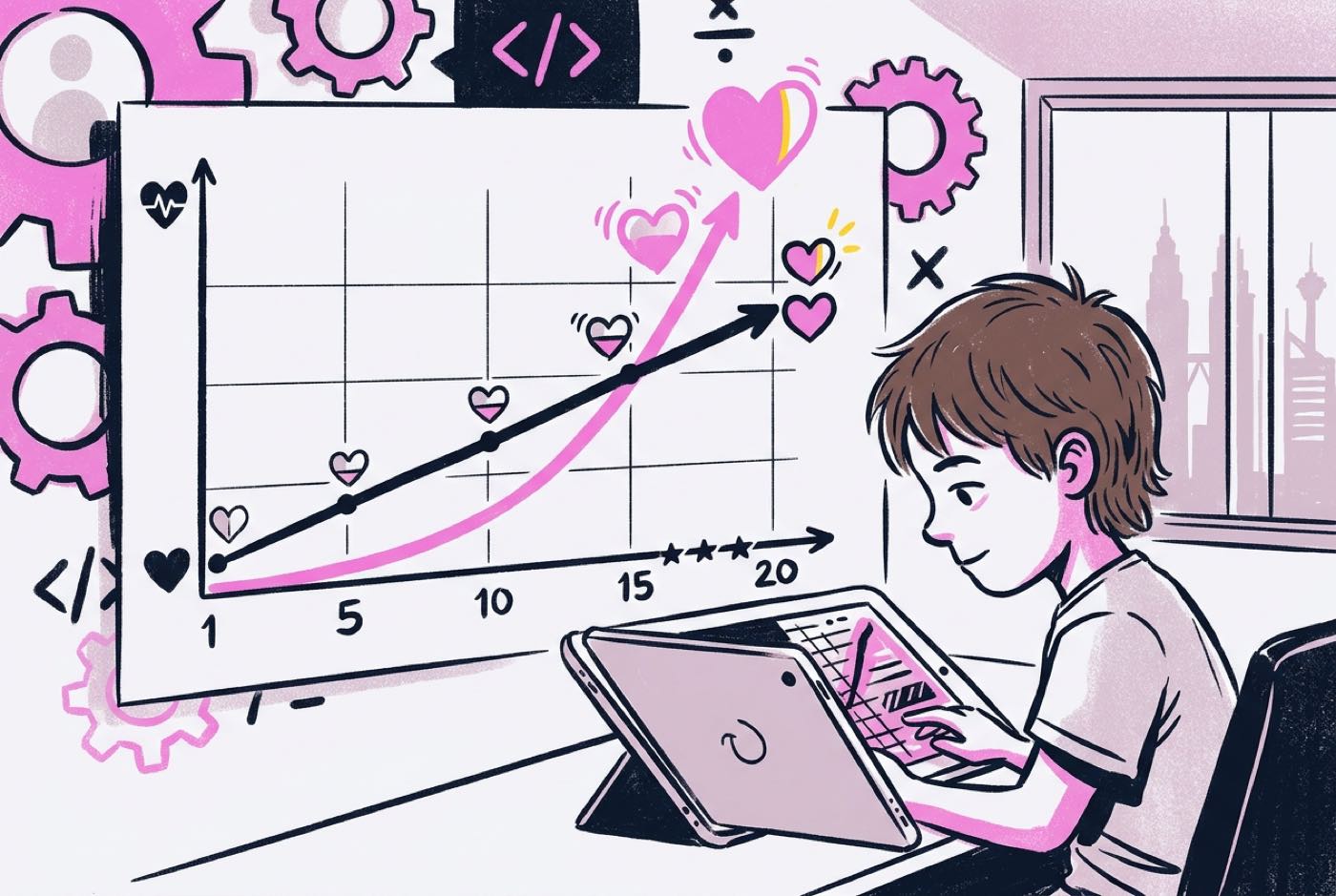 Playtest to level 20 and the exponential curve has run away into numbers nobody can fight, while the linear one has gone flat and boring by level 8. Fixing that is percentages, ratios and algebraic modelling, done because the game demands it.
Grade-Level Syllabus Map: Game Mechanics vs School Maths
Parents often ask how game building maps onto international school standards such as Cambridge IGCSE, UK National Curriculum, and US Common Core. The table below outlines how common game development tasks correlate directly with academic maths syllabuses across age groups:
| Age / School Year | Game Development Project | Mathematical Concept Applied | School Syllabus Correlation |
|---|---|---|---|
| Ages 7–9 (Year 3–4 / Primary 3–4) |
Mazes & Grid Platformers | 2D Coordinates, Grid Movement, Inequalities | Cambridge Primary Mathematics: Spatial Position & Movement |
| Ages 10–12 (Year 5–7 / Form 1) |
Space Shooters & Physics Tweaks | Velocity, Acceleration, Negative Integers, Angles | KSSR / Lower Secondary: Directed Numbers, Basic Algebra & Geometry |
| Ages 13–15 (Year 8–10 / Form 2–4) |
2D Physics Engines & RPG Systems | Vectors, Trigonometric Ratios, Bounding Geometry | IGCSE / SPM Mathematics: Vector Analysis, Trigonometry & Distance Formulas |
| Ages 16–18 (Year 11–13 / Form 5–A-Levels) |
3D Game Engines & AI Navigation | Matrix Transformations, Dynamic Calculus, Dot Products | Additional Mathematics / A-Level Maths: Advanced Vectors, Kinematics & Matrices |
Four Build-Along Mini Projects by Age Group
Four projects a child can build this month, each aimed at one piece of maths.
Project 1: The Scratch Bouncing Physics Lab (Ages 7–9)
- Primary Focus: Cartesian coordinates, inverse movement, and basic collision geometry.
- The Challenge: Program a sprite to bounce off walls smoothly without sticking to edges.
- Maths in Action:
- Detect edge bounds ( or ).
- Multiply the directional velocity by to reverse vector trajectory:
- Expected Outcome: The child sees a negative number turn a sprite around on a 2D plane.
Project 2: Roblox / Minecraft Gravity and Jump Tuner (Ages 10–12)
- Primary Focus: Rate of change, gravity coefficients, and vertical velocity acceleration.
- The Challenge: Modify Lua scripts in Roblox Studio to make character jumping feel natural across varied gravity fields (e.g., Earth vs. Moon gravity).
- Maths in Action:
- Adjust upward velocity impulse parameters.
- Apply linear reduction of vertical position per frame.
- For further context on how sandbox platforms develop technical skills, read our analysis on how Minecraft coding turns kids into creators.
- Expected Outcome: The child can predict what a change to the gravity constant will do before running the game.
Project 3: Pygame Top-Down Turret Shooter (Ages 13–15)
- Primary Focus: Trigonometry (, , ) and vector decomposition.
- The Challenge: Program a turret to rotate smoothly toward the mouse cursor and fire bullets along that target vector.
- Maths in Action:
- Calculate aiming angle: .
- Update bullet trajectories each frame using trigonometric components:
- Expected Outcome: The student uses sine and cosine as tools for aiming before meeting them again in an exam paper.
Project 4: AI Level Balancer & Loot Distribution Engine (Ages 16–18)
- Primary Focus: Applied statistics, cumulative distribution functions, and algorithmic game balance.
- The Challenge: Build a Python simulation that balances enemy spawn difficulty and loot drops based on player performance metrics.
- Maths in Action:
- Track player win rates to adjust difficulty coefficients dynamically.
- Implement weighted sampling logic to maintain fair reward distributions.
- Explore foundational principles behind machine learning models. You can read more about how AI models process data in our overview on transforming learning models in AI.
- Expected Outcome: The student tunes a live system with statistics rather than guesswork.
How Kidocode Teaches Maths Through Game Building
We treat game development as a maths classroom that happens to be fun, and three things shape how we run it.
timeline
    title The Kidocode Learning Journey
    Ages 5 - 7 : Scratch Jr & Visual Logic : Spatial Coordinates & Basic Patterns
    Ages 8 - 12 : Roblox, Minecraft & Python : Vectors, Gravity & Probability
    Ages 13 - 18 : Pygame, Web & AI Engines : Trigonometry, Calculus & Machine Learning
1. AI-Powered Personalised Learning
Every child works alongside a personalised AI tutor platform pitched at their own pace and interests. A student stuck on a vector calculation in Python gets the maths taken apart step by step through the game mechanic in front of them, not through a restated rule.
2. Maths Through Real Construction
No drill sheets, no worksheet stacks. Students cover standard international mathematics, aligned with IGCSE, Cambridge and SPM, by using it inside their own projects. A child who works out coordinate geometry to place a character on screen tends to still have it a year later.
If you are comparing different approaches to math education, explore our comparative analysis on Kumon and abacus versus learning math by building.
3. Bundled Coding & Multi-Track Expertise
Coding itself is now easy to come by, so we bundle it free across our programmes. What we charge for is computational thinking, logic and mathematical modelling.
Students can explore six technical tracks, including Python, Web Development, Mobile Apps, Game Development, Electronics, and 3D Modelling, across five physical campuses in Klang Valley (Solaris Mont Kiara flagship, Sunway Nexis) and Penang (Q2 Waterfront, Vantage Tanjung Tokong, Icon City Bukit Mertajam), as well as through our live online classes.
Printable Game Maths Debugging Checklist
Print this and keep it next to the keyboard. Most maths bugs in a student game are on it.
- Coordinate Axis Check: Is the -axis origin located at the top-left (Canvas/Pygame) or center (Scratch)? Check if upward movement requires subtracting .
- Diagonal Speed Normalisation: Does moving diagonally make the character run faster? Verify if the movement vector is normalized ().
- Jump Impulse Calibration: Is vertical movement linear instead of curved? Ensure gravity adds to velocity each frame before updating position.
- Rotation Angle Quadrant: Is the turret rotating incorrectly when aiming left or down? Use
atan2(dy, dx)instead of standardatan(dy/dx)to support all four quadrants.
Designed, ready to print and sign. We email it to you together with a 5% discount on your next registration.
Frequently Asked Questions
Will building video games help my child with their school maths exams?
It helps, though not the way a cram centre does. Coordinates, vectors, trigonometry and probability all acquire a visible purpose on screen, which is usually what was missing. Kidocode is not a test-cramming tuition centre, but parents regularly tell us their child's confidence in school maths shifts within two to four weeks of seeing the formulas do something.
Does my child need to be strong in maths before learning game development?
No, and the children who struggle most in class often move fastest here. A game engine answers immediately: change the variable, watch the motion change. That loop is much kinder than waiting a week for a marked worksheet to come back.
At what age can a child start learning maths through game creation?
From around 5 to 7, working on spatial logic, directional coordinates and pattern sequences in visual platforms like Scratch. Between 8 and 12, most move into text-based languages such as Python and Lua in Roblox, where vectors, probability and basic algebra come into play.
How does Kidocode's approach differ from traditional maths tuition centers in Malaysia?
Tuition centres mostly run on repetition and formula memorisation. We teach the same international syllabuses (IGCSE, Cambridge, SPM) through building, with a personalised AI tutor tracking each student's progress, so a formula turns up as something the child needs for a game, a robot or an AI project.
References
- Kafai, Y. B., & Burke, Q. (2016). Constructionist Gaming: Understanding the Benefits of Making Games for Learning. Educational Psychologist, 50(4), 313–334. https://pmc.ncbi.nlm.nih.gov/articles/PMC4784508/
- Taley, I. B., Amponsah, A., & Kpai, H. (2024). Exploring the Factors that Influence Students' Interest in Using Scratch to Learn Coordinate Geometry. Journal of ICT in Education (JICTIE), 11(1), 28–42. https://ejournal.upsi.edu.my/JICTIE/article/download/9165/4999/45918
- Smith, H., Closser, A. H., Ottmar, E., & Arroyo, I. (2020). Developing Mathematics Knowledge and Computational Thinking Through Game Play and Design. Contemporary Issues in Technology and Teacher Education (CITE Journal), 20(4). https://citejournal.org/volume-20/issue-4-20/mathematics/developing-mathematics-knowledge-and-computational-thinking-through-game-play-and-design-a-professional-development-program/
- Yulianto, D., Situmeang, M. S., Astari, & Nurcahyo, R. (2026). Digital Game-Based Learning in Primary Mathematics Education: A Systematic Literature Review and Meta-Analysis. Range: Jurnal Pendidikan Matematika, 7(2). https://jurnal.unimor.ac.id/JPM/article/download/10225/2682
- Duarte, C., Pais, S., & Hall, A. (2026). Designing Mathematical Games in Middle School: An Exploratory Case Study. Education Sciences, 16(1), 71. https://www.mdpi.com/2227-7102/16/1/71
- Munusamy, I., Lee Abdullah, M. F. N., & Mohamad, S. A. (2025). Educational Games in Mathematics Learning: A Review of Literature. International Journal of Research and Innovation in Social Science (IJRISS), 9(27), 28–34. https://rsisinternational.org/journals/ijriss/uploads/vol9-iss27-pg28-34-202511_pdf.pdf
- WIPO Academy / World Intellectual Property Organization. (2024). Good Practices in STEM Education: Malaysia Report. https://dacatalogue.wipo.int/projectfiles/DA_1_3_10_19_30_01/Malaysia_Report%202/EN/MALAYSIA_Report%202_GoodPracticesin%20STEM%20Education_English.pdf