


A ten-year-old looks up from a phone and announces they are going to build their own app. Most Malaysian parents feel two things at once: pride, and quiet doubt. Professional software involves programming languages, database configuration, user experience design, and architecture decisions. So parents ask a fair question. Can a child in primary school actually build software, or will they spend eight weeks dragging blocks around and come home with a glorified slideshow?
A 10-year-old can build a working application that runs on a real smartphone or in a browser. What that app looks like depends on three things: the tools, the teaching method, and how much of the modern AI workflow the class actually uses.
At Kidocode, we have trained over 9,500 students across Malaysia since 2014, and 10-year-olds design, code, debug, and install custom mobile and web apps in our classrooms every week. Below is what that process looks like, how AI changes the old learning timeline, and what a realistic first project is for a Malaysian student.
Key Takeaways
| Subject | What Parents Need to Know |
|---|---|
| Realistic Capability at Age 10 | Kids can build multi-screen apps with button interactions, input forms, local data storage, and live API integrations. |
| Visual Blocks vs Real Code | Visual drag-and-drop tools build early confidence, but AI tools now allow kids to transition to real text code (Python, JavaScript) much faster. |
| The Role of AI in 2026 | Children direct AI tools to generate boilerplate interface layouts, then inspect, debug, and customize the underlying logic. |
| Hidden Learning Benefits | App creation teaches problem decomposition, spatial coordinate math, data structure logic, and user empathy. |
| Kidocode Approach | We lead with AI literacy and math by building; coding is bundled free because computational thinking is what we actually teach. |
Table of Contents
- Why Parents Ask This: Validating Curiosity vs Feasibility
- The Modern App Development Ladder in 2026
- Web App vs Mobile App vs Game: Where Should Your Child Start?
- What Your Child Actually Learns While Building an App
- The Math Hiding Inside Mobile and Web Apps
- Where Generative AI Fits in App Creation for Kids
- 5 Realistic First-App Projects for Malaysian Students
- Age-by-Age Progression Guide (Ages 8, 12, and 16)
- Evaluating an App Development Course for Your Child
- 4-Week Action Plan for Parents
- Frequently Asked Questions
- References
Why Parents Ask This: Validating Curiosity vs Feasibility
This question comes up constantly during our free trial sessions in Kuala Lumpur and Penang. A child uses Shopee, Grab, or Touch 'n Go, or spends a weekend on Roblox, and suddenly decides they want to make something similar. The parent wants to feed that interest without paying for a course that turns out to be either too technical to survive or too shallow to matter.
The doubt has history behind it. University computer science used to demand months of syntax rules, terminal commands, and memory management before a student produced a single visible button on a phone screen. That steep academic wall is what most parents picture when they hear "app development".
Research on screen time and adolescent development points somewhere else, though. An 8-year longitudinal study tracking 260 children from primary school through age 15 found that higher screen time involving active problem-solving, cognitive processing, and structured engagement was associated with superior working memory and cognitive test performance [1] [2]. Building on a screen is a different activity from scrolling on one.
So the real question is not whether screen engagement has value. It is whether the toolchain lets a 10-year-old cross from playing to building. With today's visual development environments and AI-assisted workflows, that crossing is shorter than it has ever been.
The Modern App Development Ladder in 2026
The learning ladder itself has changed over the past decade, and that change explains most of what a 10-year-old can now do.
The old sequence was rigid: two or three years of block-based visual languages like Scratch, then MIT App Inventor or another block-based mobile builder, then text-based Python or JavaScript somewhere in upper secondary.
Visual blocks do remove the misery of missing semicolons. They also build walls. Observational studies show that visual platforms eventually create artificial boundaries [3]: students hit the limit of what the block palette offers, and the longer that moment is delayed, the more intimidating text coding feels when it finally arrives.
Generative AI assistants rewrote this ladder.
timeline
    title App Development Progression
    Ages 7 to 9 : Visual Block Dragging : Single Screen Buttons : Fixed Story Logic
    Ages 10 to 12 : AI Text Coding Assistance : Multi Screen Interfaces : Local Data Storage
    Ages 13 to 18 : Full Stack Architecture : Cloud API Integration : Production Deployment
Rather than parking a 10-year-old in block builders for years, modern app instruction uses AI tutors and code assistants to absorb the syntax friction. The child describes the interface component or the logic they want. The assistant generates an initial code structure. The child then reads it, tests it, modifies it, and wires it into the project.
That sequence puts real HTML, CSS, JavaScript, and Python frameworks within reach years earlier than the traditional model allowed. The child spends their attention on architecture, user experience, and logical relationships, and leans on AI for the typing-level details.
Web App vs Mobile App vs Game: Where Should Your Child Start?
Children who say they want to "make an app" rarely mean anything specific. A web app, a native mobile application, and a video game need different tools and teach different logic. Picking the right entry point saves your child from early overwhelm.
| Platform Type | Example Tools | What the Child Builds | Primary Logic Learned | Realism for Age 10 |
|---|---|---|---|---|
| Web Application | HTML, CSS, JavaScript, AI Tutors | Interactive websites, budget calculators, quiz tools | User interface flow, document structure, event handling | Highest: Runs immediately in any browser without app store approval. |
| Mobile Application | MIT App Inventor, Flutter Flow, React Native | Phone utilities, soundboards, prayer time trackers | Mobile sensors (accelerometer, GPS), layout scaling, button triggers | High: Can be installed directly onto an Android or iOS device via QR code. |
| Video Game | Roblox Studio, Scratch, Pygame | 3D obstacle courses, 2D platformers, puzzle games | Physics engines, spatial coordinates, loop logic, collision detection | High: Highly engaging, though logic focuses on game loops rather than data workflows. |
A child who likes structure, organizing information, or fixing small daily annoyances usually thrives starting with a web or mobile utility app. A child driven mainly by play does better entering through Roblox Studio or Pygame, which lead to the same application logic by a different door.
Our comparison of Scratch vs Python goes deeper into the visual-blocks-versus-text-code decision.
What Your Child Actually Learns While Building an App
Syntax is the first thing a child forgets and the least valuable thing they carry away. Languages and tools churn every few years. What lasts is computational thinking.
A systematic literature review covering 26 studies of school programming education found that structured problem-solving frameworks are what keep students from drowning in cognitive overload [7].
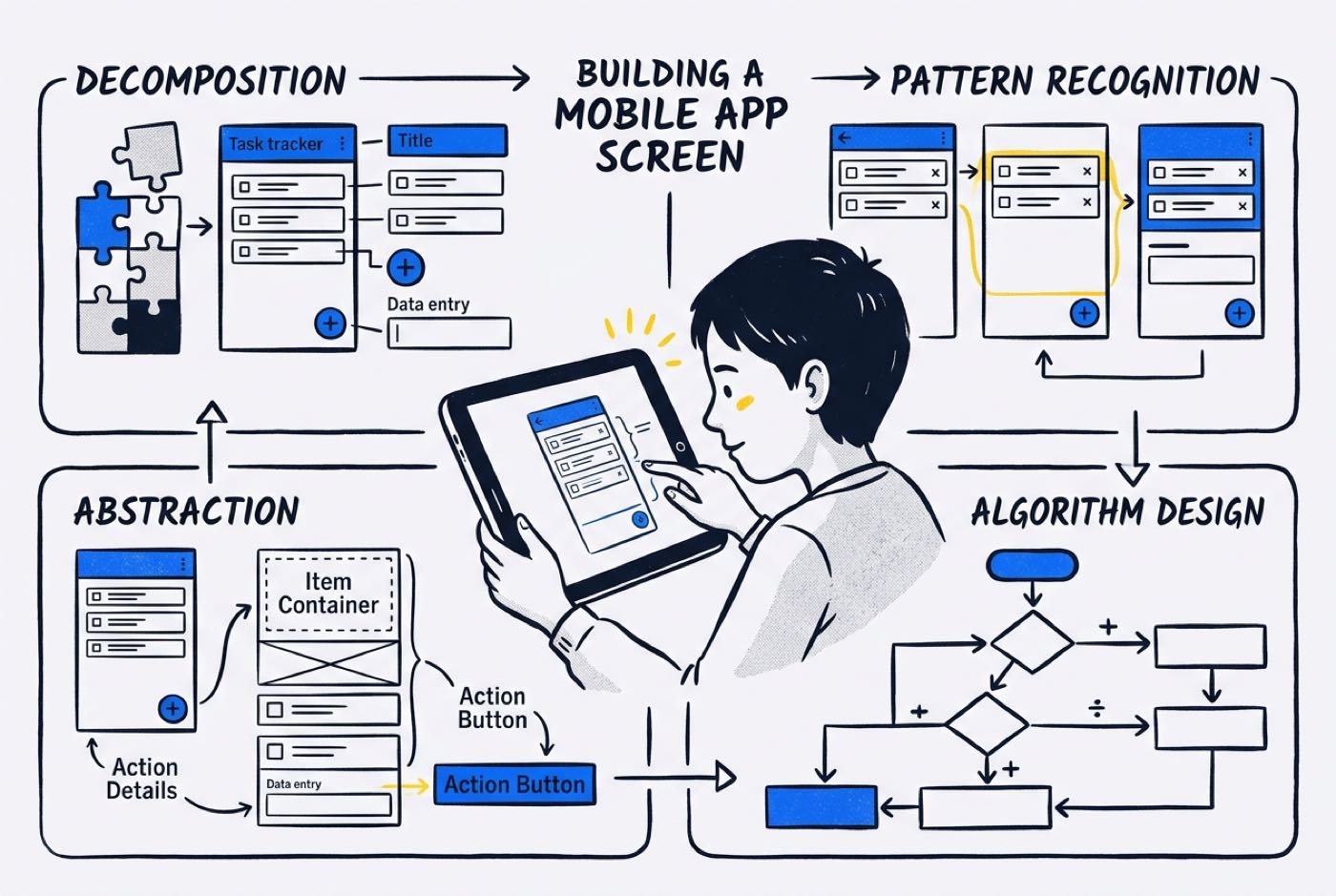
Building an app exercises four components of that thinking at once:
- Decomposition: Taking a large idea, say "I want an app that calculates school lunch expenses", and splitting it into a text input box, a numerical variable, an addition operation, and a screen display update. A peer-reviewed randomized controlled trial involving 200 primary school students found that structured programming instruction produced its largest measurable effect size in decomposition skills () [4].
- Abstraction: Deciding what matters and what to ignore. In a homework deadline tracker, subject names and due dates matter; font rendering details do not.
- Pattern Recognition: Noticing that the button which adds food items to a cart runs on the same logic as the button which adds points in a quiz app.
- Algorithmic Design: Writing the step-by-step instructions the computer follows when a user taps the screen.
Something less technical happens too. The child stops designing only for themselves. They start asking whether a button is too small for their mother's thumb, or what the app should do if someone types a letter into the budget field. That is user empathy, and it arrives on its own once a real person tests their work.
The Math Hiding Inside Mobile and Web Apps
Parents are often surprised by how much school mathematics is buried inside app development. In class, math tends to arrive as worksheets full of equations to memorize before an exam. Inside an app, math is a practical tool: get it wrong and the software visibly breaks.
Our math philosophy at Kidocode starts from one reframe: the kid is fine, the teaching was not. Children struggle with math mostly because they are asked to memorize abstract rules they never see operate on anything. Building an app makes those rules concrete.
Three examples:
1. Spatial Geometry and Screen Coordinates
Centering a button on a phone screen requires relative positioning and two-dimensional coordinate geometry. Every element on a mobile canvas sits at a specific point.
Scaling a container across different screen sizes means percentage calculations and simple linear scaling:
A child who freezes at percentages on paper understands them within a minute of watching their interface clip off the edge of an iPad because the percentage was wrong.
2. Condition Logic and Inequalities
Interactive apps run on Boolean algebra and mathematical inequalities. Take an app that checks whether a student has saved enough pocket money for a book:
if (savedMoney >= bookPrice) {
    displayMessage("You can afford this item!");
} else {
    let difference = bookPrice - savedMoney;
    displayMessage("You need RM " + difference + " more.");
}
Subtraction, algebraic variables, and relational operators (), all practiced without a drill worksheet in sight.
3. Data Collections and Averages
A child building a grade tracker has to calculate the mean of their subject scores:
Summing and dividing stop being steps to memorize and become steps the software depends on. Our guide on math tuition vs learning math by building covers how we thread math through project work.
Where Generative AI Fits in App Creation for Kids
Plenty of Malaysian parents worry that handing a child AI tools produces lazy learning. If the AI writes the code, does the child learn how software works?
We tackle this in our guide on whether a child is relying too much on AI. Using AI to skip thinking damages learning. Using AI as a cognitive assistant speeds it up. The difference is what the child is asked to do with the output.
Professional engineers in 2026 rarely write every line from memory. They use assistants for boilerplate, test data, and syntax patterns. Their actual skill is directing the AI, judging its output, spotting the logical flaws, and integrating the pieces safely.
A 10-year-old building an app with AI assistance at Kidocode works the same way:
- Prompt Engineering & Specification: The child has to say precisely what they want. "Make a button" gets nowhere. "Create a JavaScript function that takes a numerical input from the user, checks if it is a positive integer, and adds it to a total balance array" gets a usable answer.
- Code Reading and Verification: The AI tutor returns a snippet. Before it goes into the editor, the child reads it and explains to their trainer what each line does.
- Debugging and Fixing: AI-generated code carries assumptions that rarely match the child's interface exactly. The child runs the app, locates where the logic breaks, and either sharpens the instructions or fixes the variables by hand.
Run that loop enough times and the child stops being a syntax memorizer and starts being a system director. Our comparison of AI literacy vs coding skills for kids explains what early AI literacy does for long-term learning.
5 Realistic First-App Projects for Malaysian Students
So what does an app built by a 10-year-old actually do? Here are five projects our primary school students have built. None are visual mockups. All five have working logic, user inputs, live calculations, and screens that update.
1. Homework and Exam Revision Planner
- Target User: The student and their classmates.
- Core Function: Allows the student to select their subjects (e.g., Bahasa Melayu, English, Mathematics, Science), input exam dates, and check off completed revision topics.
- Logic Learned: Lists, state updates (completed vs pending), date comparison logic, and persistent local storage so data remains saved when the app closes.
2. Tuck Shop Budget Tracker
- Target User: Primary school students managing weekly pocket money.
- Core Function: The user inputs their weekly allowance, logs daily canteen purchases (e.g., nasi lemak, fruits, drinks), and views a remaining balance indicator.
- Logic Learned: Arithmetic variables, condition warnings when spending exceeds budget limits, and percentage-based progress bars.
3. Klang Valley MRT / Rapid Penang Trip Helper
- Target User: Family members commuting on public transport.
- Core Function: Users select their starting station and destination from dropdown menus to calculate estimated fare and travel time, incorporating static station data.
- Logic Learned: Array mapping, dictionary lookups, conditional statements, and user interface selection handling.
4. Primary School Science Quiz App (KSSR Syllabus)
- Target User: Younger siblings or classmates preparing for school assessments.
- Core Function: Presents multiple-choice questions on Standard 4 or Standard 5 Science topics, tracks current score, displays instant feedback, and shows a final summary card.
- Logic Learned: Index tracking, random selection algorithms, score calculation, and user interface screen transitions.
5. Sibling Chore and Allowance Manager
- Target User: Household members tracking weekly tasks.
- Core Function: Lists household chores (e.g., washing dishes, watering plants) assigned to different siblings. Completing a chore adds a predefined value to a collective reward counter.
- Logic Learned: Multi-user view structures, cumulative addition functions, and confirmation dialog triggers.
More project ideas and the pathways behind them sit in our article on how to teach app development for kids.
Age-by-Age Progression Guide (Ages 8, 12, and 16)
What a child can build tracks their cognitive reasoning, spatial visualization, and reading ability. Here is what to expect at each stage:
Ages 5 to 8 (Early Learners)
- Focus: Algorithmic thinking, cause-and-effect triggers, visual sequencing.
- Typical App Project: Interactive digital storybooks, simple soundboard apps where tapping images plays spoken vocabulary words, or basic single-screen matching games.
- Tools: Scratch, ScratchJr, block-based tap builders.
- Parent Expectation: The child works from visual blocks and guided prompts. Enjoying the act of creating matters more here than code logic. Our guide to early age coding covers strategies for this stage.
Ages 9 to 12 (Primary & Early Secondary)
- Focus: Multi-screen layouts, user variables, conditional logic, AI assistant direction.
- Typical App Project: Utility applications (budget trackers, quiz applications, study schedules) that can be loaded onto an Android or iOS test device.
- Tools: MIT App Inventor, HTML/CSS/JavaScript with AI tutor guidance, Roblox Studio Lua scripting.
- Parent Expectation: The child designs interface screens on their own, explains how input variables move through functions, and fixes basic logical errors with a trainer nearby.
Ages 13 to 18 (Teens & Upper Secondary)
- Focus: Full-stack application architecture, databases, cloud API integrations, deployment.
- Typical App Project: Web applications connected to real-time APIs (e.g., live weather or currency rates), database-backed community portals, or machine learning classification tools.
- Tools: Python (Flask/FastAPI), JavaScript (React/Vue), Flutter, Git version control, generative AI APIs.
- Parent Expectation: The student takes a concept from wireframe to a deployed, live web application that friends or family can open in any browser.
For university preparation and portfolio building with older teens, see our breakdown of whether coding and AI help with university admissions.
Evaluating an App Development Course for Your Child
Technology classes vary wildly in quality, so the curriculum deserves a hard look before you enroll.
Systematic reviews of school computer science instruction name the same recurring pitfalls: inadequate technological tools, surface-level copy-pasting, and no individual debugging support [7].
Three red flags worth checking for in any Malaysian app development class, and how we handle each:
Red Flag 1: Sticking Exclusively to Pre-Made Drag-and-Drop Templates
- The Problem: Children drag finished templates around a screen and never write or read the logic underneath. They go home with a nice-looking design and no computational understanding.
- The Kidocode Difference: Visual tools are scaffolding, not a residence. Because our students work alongside personalized AI tutors, they move to real text code early and learn how event listeners and variables actually behave.
Red Flag 2: Teaching Coding as Isolated Syntax Drills
- The Problem: Programming taught like vocabulary memorization. Commands drilled in isolation, no complete working product at the end.
- The Kidocode Difference: Every Kidocode session is project-first. Nobody learns "for loops" as a topic; a student writes a loop because their app has to total up expenses or render a list of high scores.
Red Flag 3: Ignoring AI Tools and Modern Development Workflows
- The Problem: Teaching the way 2010 taught, with children typing repetitive syntax line by line and AI assistance banned outright.
- The Kidocode Difference: As Malaysia's pioneer AI and coding school, we put AI literacy at the front of every track. Students learn to direct AI tools responsibly, question the output, and hold to safety and structural standards.
Kidocode runs five physical campuses in Malaysia: Solaris Mont Kiara flagship HQ and Sunway Nexis in PJ for the Klang Valley, plus Q2 Waterfront, Vantage Tanjung Tokong, and Icon City in Penang. Our live online programme uses camera-on sessions that mirror the physical classroom for families elsewhere in Malaysia and abroad.
On packages, we lead with our Triple Degree framework, which gives flexible access across all three core pillars: AI, Math, and Tech. Tech covers six disciplines: Python, Web, Mobile, Game, Electronics, and 3D. Coding instruction is bundled free within every membership package, because computational thinking and AI direction are what we are really teaching.
Our founder, Hossein Tohidi (known as Unclecode), is a computer scientist and AI researcher who created Crawl4AI, an open-source AI web-crawling engine with over 76,000 GitHub stars and millions of downloads worldwide. His research architecture feeds directly into our curriculum.
Our article on choosing coding classes for kids in Malaysia goes further into what separates a strong programme from a weak one.
4-Week Action Plan for Parents
If your child wants to build an app, you do not need to commit to anything long-term yet. Spend four weeks testing how deep the interest runs.
flowchart TD
    A[Week 1: Paper Wireframe] --> B[Week 2: Digital Tool Exploration]
    B --> C[Week 3: AI Logic Specification]
    C --> D[Week 4: Real Prototype & Trial]
Week 1: Paper Wireframe Design
Sit down with your child and a blank sheet of paper. Ask them to draw three screens of the app they have in mind:
- Screen 1: The home screen or landing view.
- Screen 2: The interaction screen where the user inputs information or makes a choice.
- Screen 3: The result screen showing what happens after the interaction.
The drawing reveals quickly whether your child has a functional vision or just a keyword.
Week 2: Explore Screen Logic
Ask your child to walk you through the paper wireframe using "If-Then" rules.
- "If I tap this button, then what opens?"
- "If I enter 10 Ringgit here, then what calculation happens?"
A child who can narrate the logic step by step is ready to move it into software tools.
Week 3: Hands-On Tool Exploration
Give your child two hours with a beginner-friendly creation platform: Scratch for 2D game logic, MIT App Inventor for layout testing, or Roblox Studio for simple environment building. The goal for the week is modest. One button, one visible action on screen.
Week 4: Attend a Hands-On Trial Session
Book a free hands-on trial at a specialist learning center. Our trial runs up to two hours. Your child sits with a trainer, picks a project in AI, math, or tech, and builds a working software artifact from scratch that you can inspect at the end. Both parents are welcome to sit in and watch.
Printable App Project Discovery Worksheet
Work through this planning sheet with your child before they start building.
- What is the name of my app concept?
- What single problem does this app solve for the user?
- Who will use this app? (e.g., my classmates, my parents, my sibling)
- Will they open this app on a phone, a tablet, or a web browser?
Designed, ready to print and sign. We email it to you together with a 5% discount on your next registration.
Frequently Asked Questions
Does my 10-year-old need a powerful laptop to start building apps?
No. Visual builders, web-based tools, and introductory HTML/JavaScript/Python environments run fine on a standard family laptop or Chromebook with an internet connection. You only need serious hardware for heavy 3D engines like Unreal Engine or local mobile emulation.
Will learning to build apps interfere with my child's school studies?
Managed well, it supports school performance. App building reinforces the same concepts the KSSR and IGCSE syllabi teach: spatial geometry, percentages, variables, and word-problem logic. Many parents tell us that watching math do something useful inside a working app ends math-hate within 2 to 4 weeks.
Is app development suitable for a child with no prior coding experience?
Yes. Every child starts as a beginner, and modern teaching methods assume no prior programming knowledge. Intuitive interface builders and AI-guided tutors let children pick up the core concepts while building their first project.
How does app creation differ from playing games on Roblox or Minecraft?
Playing makes a child a consumer of someone else's rules. Building an app or scripting an environment in Roblox Studio makes them the author of the code, the variables, and the user experience. Our analysis of how Minecraft coding turns kids into creators goes into detail.
Can my child install their app onto a real phone?
Yes. With MIT App Inventor, web-app wrappers, or progressive web apps (PWAs), children scan a generated QR code and run their application on an Android or iOS phone or tablet. The moment their own app icon appears on a home screen next to commercial apps tends to be the moment they take themselves seriously as a builder.
What should we expect during a free trial at Kidocode?
During the free trial (up to 2 hours), your child works hands-on with a trainer to build a real project in the AI, math, or tech tracks. Both parents are invited to sit in, watch how your child learns, and inspect the finished project at the end. Book a session at our Solaris Mont Kiara flagship campus, Sunway Nexis in PJ, Q2 Waterfront in Penang, or via live online classes at kidocode.com/trial-class.
References
- ScienceDaily / University of Jyväskylä. (2026, August 17). Higher cumulative screen time from childhood to adolescence is associated with superior cognitive processing in teenage years. ScienceDaily. https://www.sciencedaily.com/releases/2026/08/260815064803.htm
- The Star / Auerbach, L. (2026, August 21). New study finds children with more screen time didn't score worse on cognitive tests: They scored better. The Star Malaysia. https://www.thestar.com.my/tech/tech-news/2026/08/21/new-study-finds-children-with-more-screen-time-didnt-score-worse-on-cognitive-tests-they-scored-better
- Hjorth, M. (2017, June 15). Visual programming languages and transition barriers to text-based code in novice learners (Master's thesis, KTH Royal Institute of Technology). KTH Diva Portal. https://kth.diva-portal.org/smash/get/diva2:1111152/FULLTEXT01.pdf
- Wang, X., Wan, F., & Dai, J. (2026, February 18). Effects of a six-month structured coding curriculum on primary school students' computational thinking and problem-solving skills: A randomized controlled trial. Frontiers in Psychology, 17, Article 1734482. https://www.frontiersin.org/journals/psychology/articles/10.3389/fpsyg.2026.1734482/full
- Huang, Y.-T., Li, C.-L., Chang, C.-C., & Tarng, W. (2025, November 19). Integrating physical hardware and visual programming environments to enhance spatial reasoning, computational thinking, and programming logic. Sensors, 25(22), Article 7059. https://www.mdpi.com/1424-8220/25/22/7059
- Williams, A. (2019, March 14). Expert says don't teach kids to code: Focus on computational thinking over language syntax. Hackaday. https://hackaday.com/2019/03/14/expert-says-dont-teach-kids-to-code/
- Abu Bakar, E. E., Abd Halim, N. D., Abdul Hanid, M. F., & Inderawati, R. (2025, April). The challenges of teaching and learning programming in schools: Insights from a systematic literature review. Karya Journal of Emerging Technologies in Human Services. https://www.researchgate.net/publication/391921231_The_Challenges_of_Teaching_and_Learning_Programming_in_Schools_Insights_from_A_Systematic_Literature_Review